반응형
Exchange Online의 ABP(주소록 정책)을 테스트 하기 위해서 AD 상에서 특정 OU의 사용자 개체들의 Company 속성을 변경하는 작업을 진행하였습니다.
지난 포스팅에 Foreach / try / catch 구조와 동일한 패턴으로 작성하였습니다.
우선 아래와 같이 질문하였고,
| In AD, I would like to collectively enter the Company property value of Contoso for objects under a specific OU. Is it possible to create a script? |
아래의 Script를 답변 받았습니다.
# Import the Active Directory module
Import-Module ActiveDirectory

# Specify the Distinguished Name (DN) of the OU
$ouDN = "OU=YourOUName,DC=domain,DC=com"

# Retrieve all AD users from the specified OU
Get-ADUser -SearchBase $ouDN -Filter * | ForEach-Object {
    # Set the Company property to Contoso for each user
    Set-ADUser -Identity $_.DistinguishedName -Company "Contoso"
}

Write-Output "Company property update completed."
-> Get-Aduser로 불러오고, Set-ADUser로 수정해주는 반복 구문이 완성되었습니다.
그리고 기존에 Foreach / Try / Catch 구조 script를 학습 시킨 뒤, 아래의 Script가 작성되었습니다.
# Import the Active Directory module
Import-Module ActiveDirectory

# Specify the Distinguished Name (DN) of the OU
$ouDN = "OU=YourOUName,DC=domain,DC=com"

# Retrieve all AD users from the specified OU
$users = Get-ADUser -SearchBase $ouDN -Filter *

# Empty array to collect results
$results = @()

foreach ($user in $users) {
    try {
        # Set the Company property to Contoso for each user
        Set-ADUser -Identity $user.DistinguishedName -Company "Contoso"

        # Add to results array
        $results += [PSCustomObject]@{
            DistinguishedName = $user.DistinguishedName
            Status = "Success"
        }
    } catch {
        # If there's an error, add it to the results array
        $results += [PSCustomObject]@{
            DistinguishedName = $user.DistinguishedName
            Status = "Failed - $($_.Exception.Message)"
        }
    }
}

# Export results to CSV
$results | Export-Csv -Path C:\csv\ADUpdate_Results.csv -NoTypeInformation -Encoding UTF8

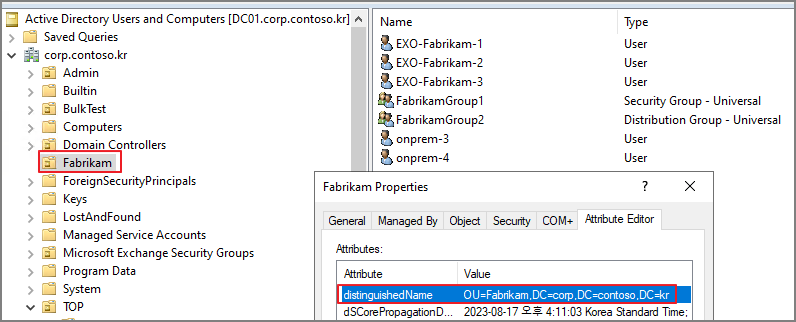
Write-Output "Company property update completed."OU의 distinguishedName을 확인합니다.
Script 변경
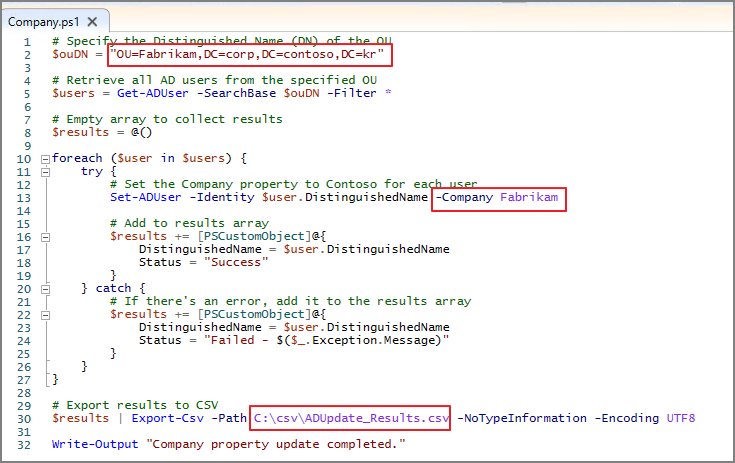
-> Fabrikam OU의 사용자 개체의 Company 속성을 Fabrikam으로 변경하는 Script가 완성되었습니다.
Script를 실행합니다. (Powershell 을 관리자 권한으로 실행해야 합니다.)

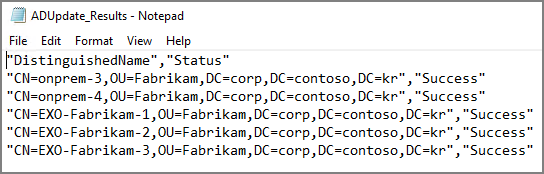
결과 확인

아래와 같이 CSV 파일로 결과 및 오류 사항에 대해서 확인할 수 있습니다.
해당 Script를 응용하면 Group 개체도 동일하게 적용할 수 있습니다.
# Specify the Distinguished Name (DN) of the OU
$ouDN = "OU=YourOUName,DC=domain,DC=com"

# Retrieve all AD groups from the specified OU
$groups = Get-ADGroup -SearchBase $ouDN -Filter *

# Initialize an empty array for results
$results = @()

foreach ($group in $groups) {
    try {
        # Set the Company property to Contoso for each group
        Set-ADGroup -Identity $group.DistinguishedName -Replace @{company="Contoso"}

        # Add to results array
        $results += [PSCustomObject]@{
            DistinguishedName = $group.DistinguishedName
            Status = "Success"
        }
    } catch {
        # If there's an error, add it to the results array
        $results += [PSCustomObject]@{
            DistinguishedName = $group.DistinguishedName
            Status = "Failed - $($_.Exception.Message)"
        }
    }
}

# Export results to CSV
$results | Export-Csv -Path C:\csv\GroupUpdate_Results.csv -NoTypeInformation -Encoding UTF8

Write-Output "Company property for groups update completed."
변경 사항 확인

CSV 파일로 결과가 정리된 것을 확인할 수 있습니다.

반응형
'ChatGPT > Powershell Script' 카테고리의 다른 글
| ChatGPT. Powershell Bulk 작업 결과를 CSV 파일로 내보내기 Script 제작 (foreach,try catch 구문) (0) | 2023.10.02 |
|---|